
Microsoft OneDrive
- 100M+SIZE
4.6
- 4+AGE
Advertisement
Updated
2025-03-28Platform
AndroIdCurrent Version
7.26Developer
Microsoft CorporationSecurity
100% Safe
Advertisement
View App Details
Verified antivirus
Get The AppDESCRIPTION
Microsoft OneDrive: Your Ultimate Business Office Solution
Microsoft OneDrive, a powerful cloud storage and file sharing service, is a must-have tool for professionals and businesses looking to enhance productivity and collaboration. With its seamless integration with Microsoft Office suite and robust features, OneDrive offers a comprehensive solution for storing, accessing, and sharing files securely.
Key Features and Primary Uses
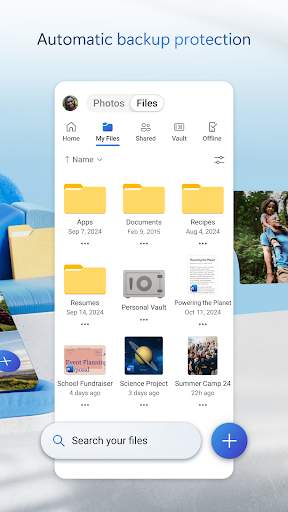
OneDrive allows users to store files, photos, and documents in the cloud, making them accessible from any device at any time. Its collaboration features enable real-time editing and sharing of files, fostering teamwork and boosting efficiency. Integration with Microsoft Office apps such as Word, Excel, and PowerPoint ensures a smooth workflow for creating, editing, and sharing documents.
Practical Value and User Experience
One of the main benefits of OneDrive is its flexibility and accessibility. Users can access their files from any device with an internet connection, making remote work seamless. The user-friendly interface makes it easy to organize files, collaborate with team members, and share documents securely. Automatic syncing ensures that all files are up to date across devices, eliminating the risk of version control issues.
Typical Use Cases
Business professionals can use OneDrive to store and share project documents, collaborate on reports in real-time, and access files while on the go. Team members working on a presentation can co-author the document simultaneously, providing feedback and making edits in real time. OneDrive is also great for backing up important files and ensuring data security in case of hardware failure.
Unique Advantages of OneDrive
OneDrive stands out for its seamless integration with Microsoft Office apps, providing a unified platform for document creation, storage, and sharing. The robust security features, such as encryption and multi-factor authentication, ensure that sensitive data remains protected. The generous storage capacity and cross-platform compatibility make OneDrive a versatile tool for professionals across industries.
Potential Limitations and Usage Tips
While OneDrive offers immense benefits, users should be mindful of storage limitations based on their subscription plan. Additionally, proper folder organization and file naming conventions can help maintain a clutter-free workspace. It's important to be aware of sharing permissions to avoid unintentional data exposure.
In conclusion, Microsoft OneDrive is a game-changer for businesses looking to streamline collaboration, enhance productivity, and ensure secure file storage. With its plethora of features and seamless integration with Microsoft Office, OneDrive is a valuable asset for modern professionals seeking efficient workflow solutions.
Screenshots